
Trong bài viết này, bạn sẽ học cách tạo một website đơn giản bằng Django, từ khởi tạo project đến hiển thị dữ liệu từ database.
- Tạo Project
Cài đặt Django
pip install django
Kiểm tra version
pip show django

Tạo project
django-admin startproject myproject
cd myproject
Chạy server
python manage.py runserver
Mở trình duyệt:
http://127.0.0.1:8000/
Kết quả:

- Tạo App
Tạo app
python manage.py startapp myapp Kích hoạt app trong settings.py INSTALLED_APPS = [
‘myapp’,
]
- Tạo Model (Database)
models.py
from django.db import models
class Student(models.Model):
roll_no = models.IntegerField()
name = models.CharField(max_length=50) def __str__(self):
return self.name
- Migration Database
Tạo migration
python manage.py makemigrations Áp dụng DB
python manage.py migrate
- Tạo View
views.py
from django.shortcuts import render
from .models import Student
def index(request):
# Demo: tạo dữ liệu mẫu
Student.objects.create(roll_no=1, name=”Nguyen Van A”)
Student.objects.create(roll_no=2, name=”Tran Thi B”)
data = Student.objects.all()
return render(request, ‘index.html’, {‘students’: data})
Đây là nơi xử lý logic khi user truy cập web
- Tạo Template (Giao diện HTML)
Tạo thư mục
myapp/templates
index.html
<!DOCTYPE html>
<html>
<head>
<title>Student List</title>
<link href=”https://cdn.jsdelivr.net/npm/[email protected]/dist/css/bootstrap.min.css” rel=”stylesheet”>
</head>
<body>
<div class=”container mt-5″>
<h1 class=”text-center mb-4″>Danh sách sinh viên</h1>
<table class=”table table-bordered table-hover table-striped”> <thead class=”table-primary”>
<tr>
<th>Roll No</th>
<th>Name</th>
</tr>
</thead>
<tbody>
{% for s in students %}
<tr>
<td>{{ s.roll_no }}</td>
<td>{{ s.name }}</td>
</tr>
{% empty %}
<tr>
<td colspan=”2″ class=”text-center”>Không có dữ liệu</td> </tr>
{% endfor %}
</tbody>
</table>
</div>
</body>
</html>
- Tạo URL
myapp/urls.py
from django.urls import path
from . import views
urlpatterns = [
path(”, views.index, name=’index’),
]
myproject/urls.py
from django.contrib import admin
from django.urls import path, include
urlpatterns = [
path(‘admin/’, admin.site.urls),
path(”, include(‘myapp.urls’)),
]
Chạy lại server
python manage.py runserver
Kết quả:
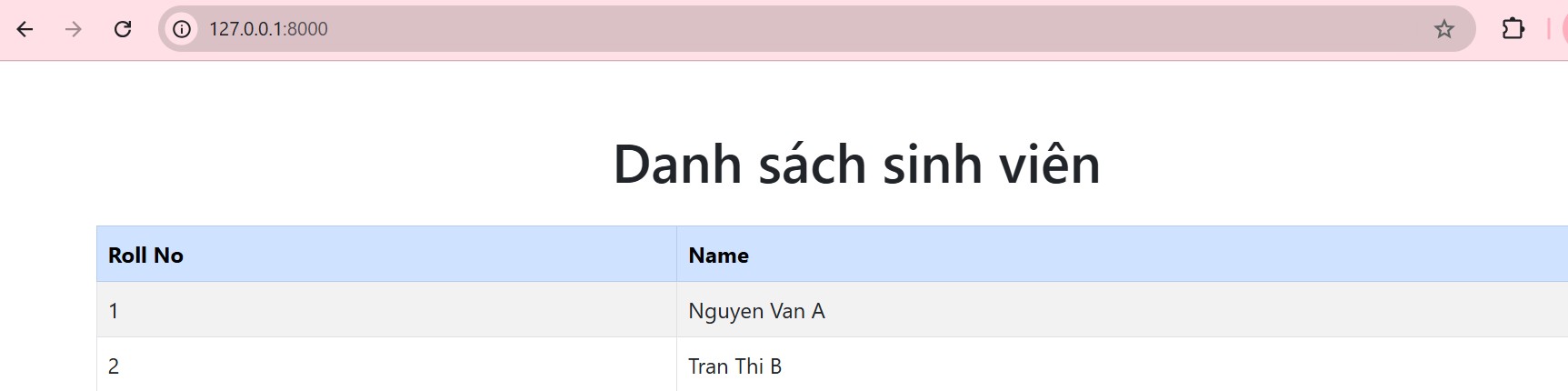
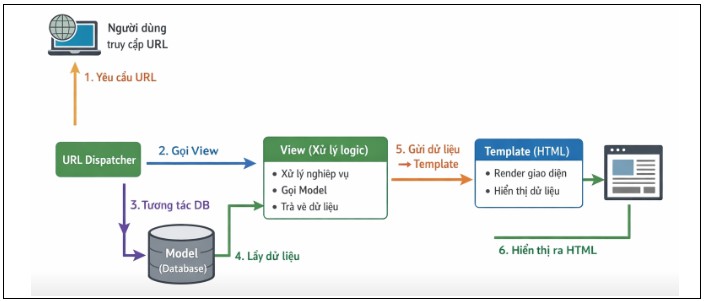
- Luồng hoạt động
- User truy cập URL
- URL → gọi View
- View xử lý logic
- View gọi Model (database)
- View gửi data → Template
- Template hiển thị HTML
Tổng kết
Sau khi hoàn thành bài hướng dẫn này, bạn đã nắm được các bước cơ bản để xây dựng một website với Django. Đồng thời, bạn cũng hiểu được cách Django vận hành theo mô hình MVT (Model – View – Template), giúp tách biệt rõ ràng giữa dữ liệu, xử lý logic và giao diện.
Từ nền tảng này, bạn có thể tiếp tục phát triển và nâng cao kỹ năng xây dựng web với Django một cách dễ dàng hơn.
Giảng viên Phạm Thị Lánh
| FPT Aptech trực thuộc Tổ chức Giáo dục FPT có hơn 25 năm kinh nghiệm đào tạo lập trình viên quốc tế tại Việt Nam, và luôn là sự lựa chọn ưu tiên của các sinh viên và nhà tuyển dụng. |